
Home › Safety
Safety on every ride
Built in for riders and drivers. They help, but they don't replace emergency services: in an emergency, call 112.

Checked drivers
Our team checks each driver's documents (licence, vehicle RC, vehicle photo and selfie) before they can go online. It is a document check, not a guarantee.
OTP to start
A trip booked in the app starts only with the rider's code, a simple check that you're in the right auto.
SOS
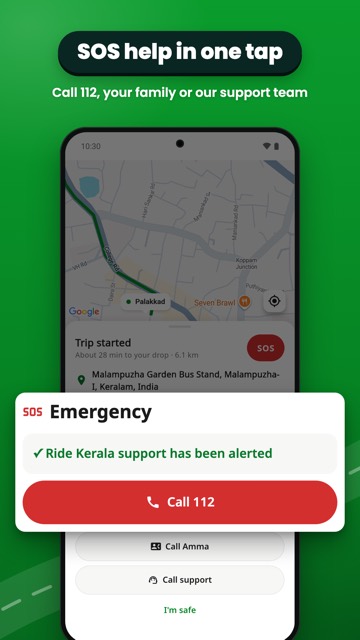
One tap sends an alert to Ride Kerala support, with a button to call 112. Riders can also call their emergency contact.
Share your trip
Send the driver's name, vehicle number, pickup and drop to family on WhatsApp.
Report a problem
Overcharged, left something behind or felt unsafe? Report it from your ride history.
Real people to help
Call or WhatsApp our support team in Palakkad.
With a called auto (“Call an auto”), check the auto number we show you before you get in, and send it to your family on WhatsApp.
Questions about safety
Safety
Are the drivers checked?
Before a driver can take rides, our team checks the documents they upload: driving licence, vehicle registration certificate (RC), a photo of the vehicle and a selfie. This check covers those documents only. It is not a guarantee of a driver's conduct or background, or of the vehicle's condition.
What does the SOS button do?
During a ride, SOS sends an alert to Ride Kerala support with the ride details and your location, and gives you buttons to call 112 and support (riders can also call their emergency contact). SOS does not replace emergency services: in an emergency, call 112. We can't promise a response time, or that an alert gets through without mobile signal.
How do I share my trip with family?
Tap “Share trip details” on the ride screen to send the driver's name, vehicle number, pickup and drop on WhatsApp. To share your live location, use WhatsApp's own live location.
How do I add an emergency contact?
Go to Profile → Settings → Emergency contact. During a ride, SOS gives you a button to call them. We don't message them automatically.
How do I report a problem with a driver or a trip?
Go to Profile → Ride history, choose the trip and tap “Report an issue”. You can report a lost item, being asked to pay more than the fare, feeling unsafe, the driver contacting you after the trip, or something else. Reports can be sent within 7 days of the trip (30 days for safety reports). You can also call or WhatsApp support on +91 62354 55560.
Drivers: how do I report a problem with a rider?
Call or WhatsApp support on +91 62354 55560, or email xqtechsolutions@gmail.com. In an emergency, use SOS or call 112.
What happens after I report something?
We acknowledge complaints within 24 hours and aim to resolve them within 15 days. We may contact both sides and, where needed, limit or suspend an account. We can't promise a particular outcome.
I left something in the auto. What can I do?
Report it from Profile → Ride history → the trip → Report an issue → “I left something in the vehicle”, or call support. We will try to help you reach the driver, but we can't guarantee that the item will be found.